
Novogene Korea
  • Novogene Korea
  • Genomics
    • Human Whole Genome Sequencing
    • Plant & Animal Whole Genome Sequencing
    • Microbial Whole Genome Sequencing
    • Whole Exome Sequencing
    • Plant & Animal De novo Sequencing
    • Microbial De novo Sequencing
    • Amplicon Sequencing
    • Shotgun Metagenomics Sequencing
    Transcriptomics
    • mRNA Sequencing
    • Total RNA Sequencing
    • Full-Length Transcriptome Sequencing
    • Whole Transcriptome Sequencing
    • Small RNA Sequencing
    • Circular RNA Sequencing
    • Metatranscriptome Sequencing
    • Prokaryotic RNA Sequencing
    Single Cell & Spatial Omics
    • Single Cell Gene Expression
    • Single Cell Immune Profiling Sequencing
    • Single Cell Long Read Transcriptome
    • Visium HD Spatial Gene Expression
    • Stereo-Seq Spatial Gene Expression
    • Xenium In Situ Spatial Transcriptome
    Epigenomics
    • Whole Genome Bisulfite Sequencing (WGBS)
    • Directed DNA Methylation Sequencing (DM-Seq) NEW
    • Reduced Representation Bisulfite Sequencing (RRBS)
    • Chromatin Immunoprecipitation Sequencing (ChIP-seq)
    • RNA Immunoprecipitation Sequencing (RIP-seq)
    • Assay for Transposase-Accessible Chromatin with Sequencing (ATAC-seq)

    Premade Library

    • Sequencing Only (Illumina 플랫폼)
    • Sequencing Only (PacBio 플랫폼)
    Proteomics & Metabolomics
    • Olink Proteomics
    • Quantitative Proteomics (MS)
    • Untargeted Metabolomics (MS)
  • 프로모션프로모션
    • 플랫폼
    • 자동화 운송 플랫폼 (Falcon)
    • BI 분석툴 (NovoMagic)
    • Customer Service System (CSS)
    • 브로셔
    • 케이스 스터디
    • 웨비나
    • 블로그
    • 샘플준비 가이드라인
    • 커뮤니티
    • 암 연구
    • 면역 종양학
    • 농업
    • 환경
    • 식품
    • 인간 마이크로바이옴
    • 동물 & 식물 마이크로바이옴
    • 신약개발
    • 희귀 질환 연구
    • 회사소개
    • 글로벌 입지
    • 뉴스룸
    • 채용 정보
  • 문의하기문의하기
  1. Home
  2. Resources
  3. Blog
  4. GEO data mining (IB) - Downloading Sequence Read Archive raw data

GEO data mining (IB) - Downloading Sequence Read Archive raw data

Life science researchers may be interested in performing bioinformatics research or in incorporating bioinformatics analysis into their research programs, but they may not be sure which gene is the best starting point. Alternatively, they may have a gene of interest, but may be unsure of how to find disease research data that can be used for further analysis.

The Sequence Read Archive (SRA) database is an excellent source of raw sequencing data that can be mined to address those questions or uncertainties. For example, SRA data can be a source of potentially interesting genes from high-scoring publications with source data that can be downloaded for in-depth mining analysis, and then bioinformatics results can be verified with “wet lab” experiments.

In Part IA , we covered how to download Gene Expression Omnibus (GEO) data. However, using GEO expression matrix data to analyze up- or down-regulation of genes is not the only source of innovative research, and some “star” genes in the GEO database may have already been thoroughly analyzed. Original published raw sequencing data in the SRA database is another source of great potential waiting to be tapped. Investigators who are used to traditional work on coding genes can use SRA data to enrich their studies with non-coding genes and explore DNA regulatory elements. If the sequencing depth is very deep, trans-shearing can be studied to mine potential circular RNAs. Even the original sequencing data can be analyzed from scratch to explore new genes. Therefore, combining the GEO database and SRA database for data mining enables investigators to explore gene functions and pathways expansively and in greater detail than if they used only one of the two databases.

Introduction of SRA Database

The SRA database is an NCBI (National Center for Biotechnology Information) sub-library for storing high-throughput sequencing data. The SRA database collects original sequencing data, and the original sequencing data from published articles around the world can be downloaded for free. The basic framework of the SRA database uses four types of metadata: STUDY, SAMPLE, EXPERIMENT, and RUN.
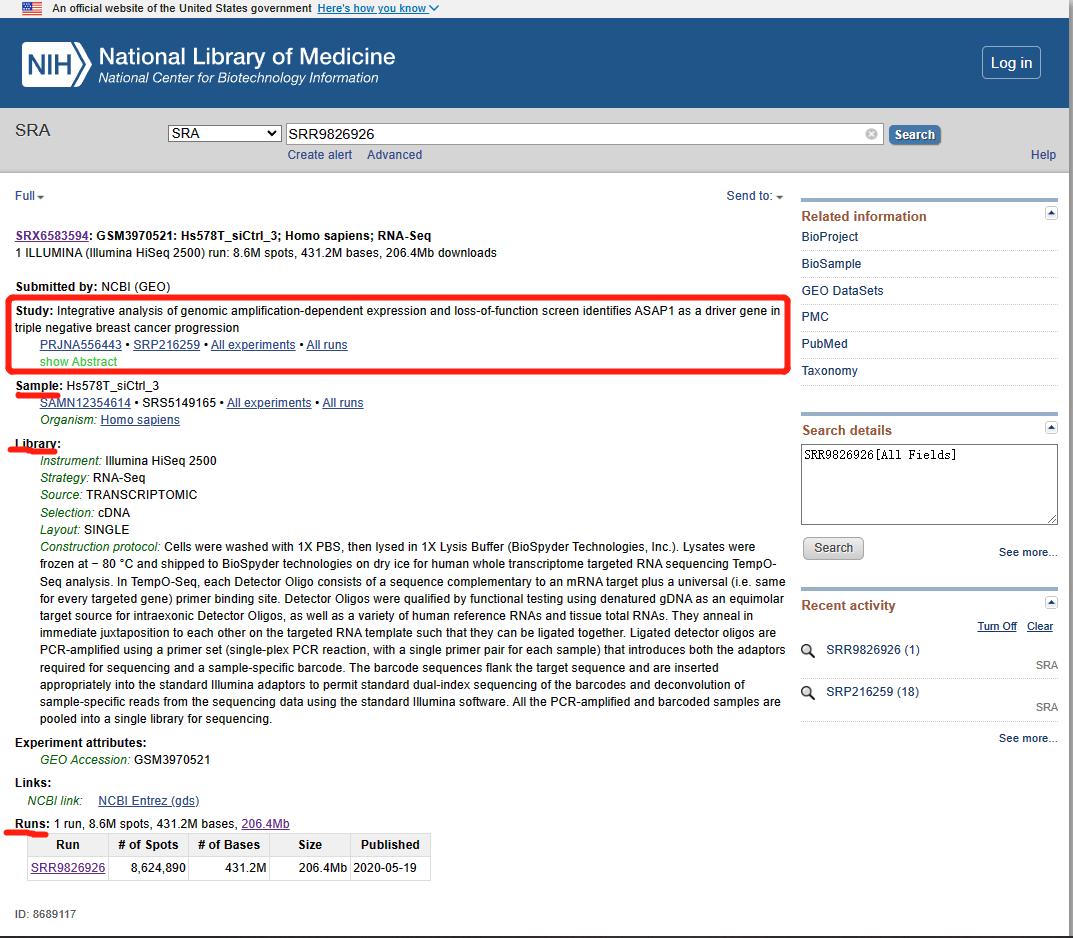
  • STUDY: corresponds to a research topic or research project. These have the prefix “SRP,” “DRP,” or “ERP.”
  • SAMPLE: one or more samples make up an experiment. These have the prefix “SRS,” “DRS,” or “ERS.”
  • EXPERIMENT: includes one or more samples for one or more RUN sequencing results. These have the prefix “SRX,” “DRX,” or “ERX.”
  • RUN: corresponds to results. These have the prefix “SRR,” “DRR,” or “ERR”.The rest of this article will focus on downloading RUN files because they contain actual sequence data in FASTQ format.
Downloading SRA library raw data

Raw sequence data can be downloaded from the SRA database in both non-LINUX and LINUX operating environments.
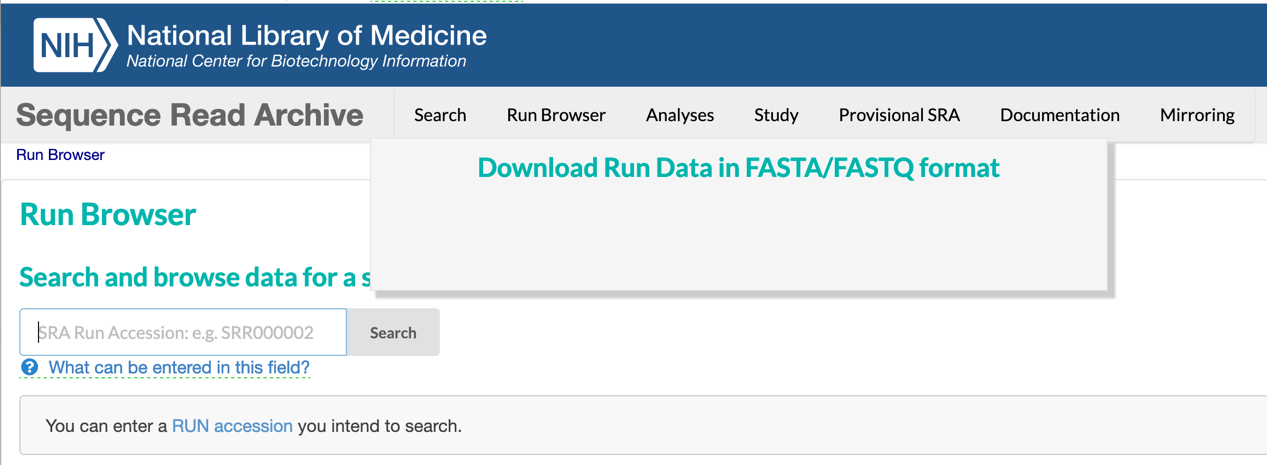
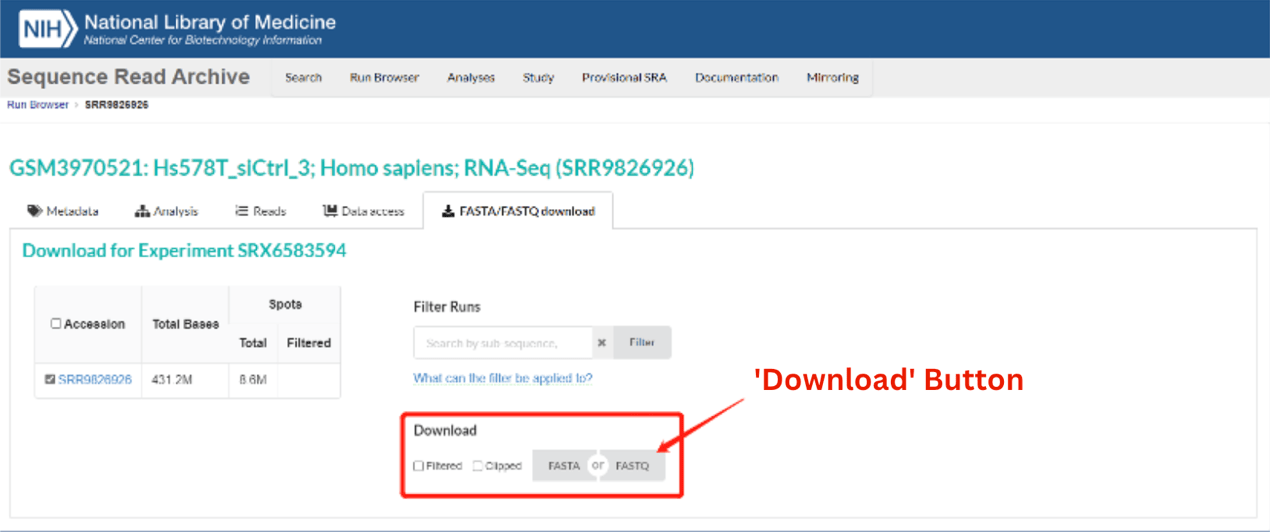
The first letter of a prefix indicates the source database to which the sample was originally uploaded: S, SRA; D, DNA Data Bank of Japan (DDBJ); and E, European Bioinformatics Institute (EBI). The SRA database synchronizes the sequencing data from EBI and DDBJ. (circled in red).
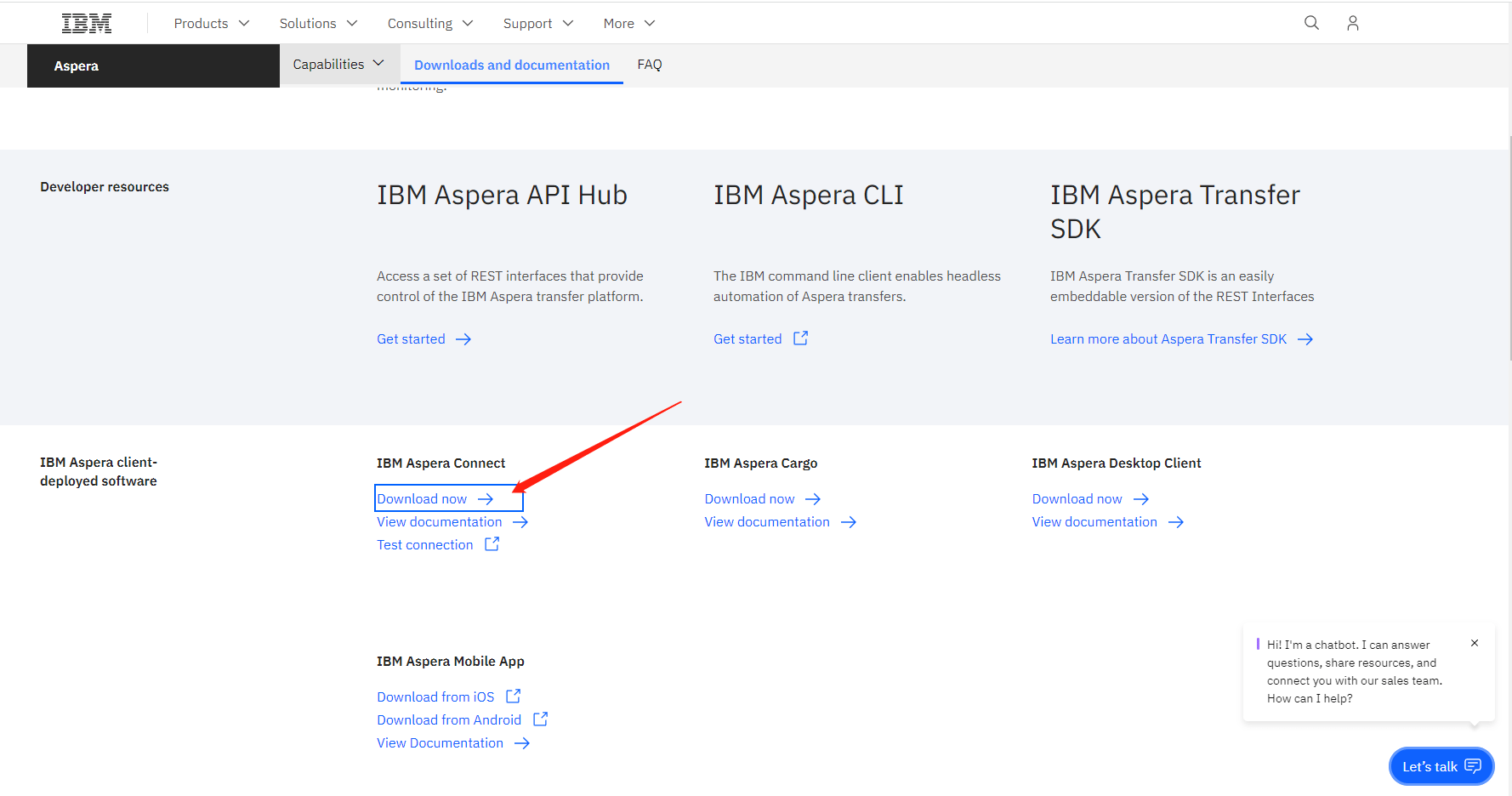
2. Browser plug-ins The IBM Aspera Connect browser plug-in enables quick downloading of batched SRA data. Download the Aspera connect plug-in (https://www.ibm.com/aspera/connect/) as shown in the image below, the follow the webpage download steps described above.
Downloading SRA data in a LINUX operating environment SRA data can be downloaded in a LINUX environment using the prefetch command to grab the Accession List information downloaded by SRA (shown in the image below) and then using Aspera Connect to download to the required FASTQ file(s).

Prefetch command download First, integrate the Accession List to be downloaded through the RUN selector of SRA, and then download SRA files in batches through the Linux command line. https://www.ncbi.nlm.nih.gov/sra/?term=SRP216259
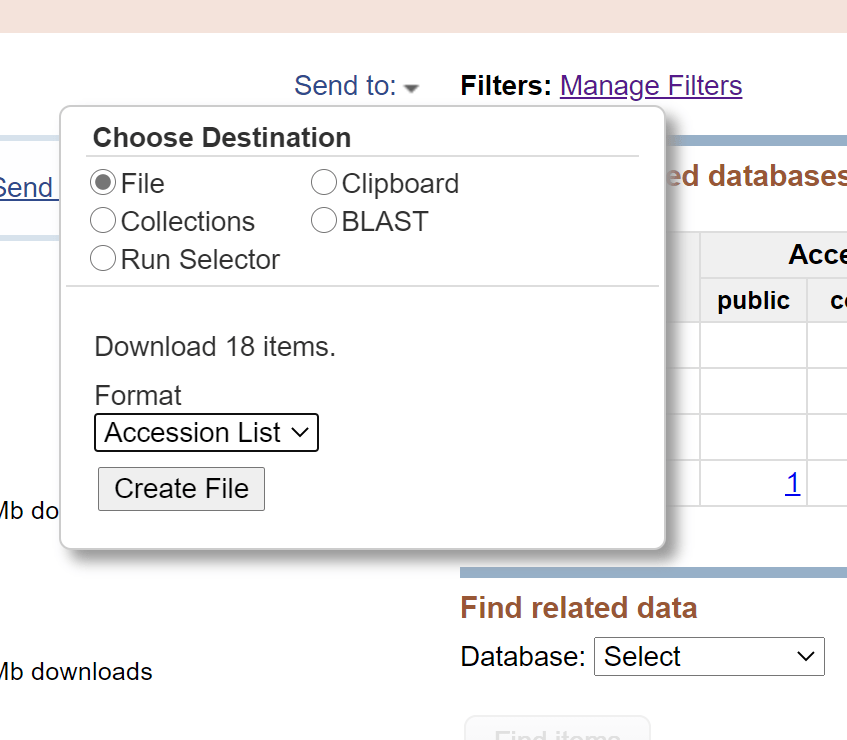
Click the button of ‘Create file’ to get the Accession list

# Use the prefetch command to download a single file: such as SRR1039510 prefetch SRR1039510 # Batch download: create a loop and check outputdir=/**/sra cat sampleId.txt | while read id do echo “prefetch ${id} -O ${outputdir} ” done >download.sh nohup sh download.sh >download.log & # Verify data integrity Vdb – validate SRR1039510

Aspera Connect download Search the European Nucleotide Archive (ENA;
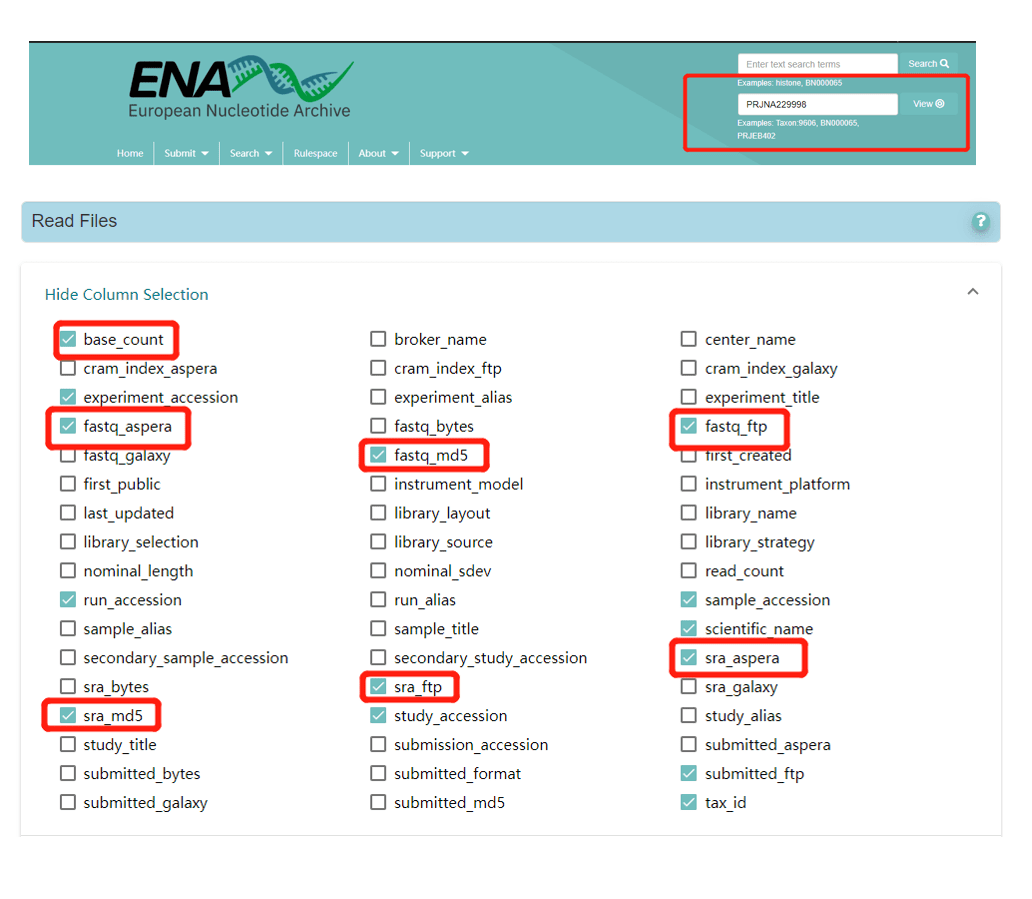
https://www.ebi.ac.uk/ena/browser/home) for a project number of interest to obtain the download address of the relevant FASTQ file(s), and check the required information under Column Selection. For example, the image below shows the Column Selection options for project PRJNA229998 (https://www.ebi.ac.uk/ena/browser/view/PRJNA229998). Use the following code to download the FASTQ files via Aspera Connect:

# download a single file # sra format ascp -k 1 -QT -l 300m -P33001 -i ~/**/asperaweb_id_dsa.openssh era-fasp@fasp.sra.ebi.ac.uk:/vol1/srr/SRR103/008/SRR1039508 . # gz format ascp -k 1 -QT -l 300m -P33001 -i ~/**/asperaweb_id_dsa.openssh era-fasp@fasp.sra.ebi.ac.uk:/vol1/fastq/SRR103/000/SRR1039510/SRR1039510_1.fastq. gz . # Batch download # Get the sra.url file, if there are special characters at the end of the line, run sed -i “s/\s*$//g” sra.url to remove the special characters at the end of the line cat filereport_read_run_PRJNA229998_tsv.txt |awk ‘NR>1{print $NF}’ >sra.url cat filereport_read_run_PRJNA310728_tsv.xls |awk -F ‘\t’ ‘NR>1 {print $20}’ |tr ‘;’ ‘\n’ >fastq.url # Order outputdir=/**/sra cat sra.url | while read id do echo “ascp -k 1 -QT -l 300m -P33001 -i ~/**/asperaweb_id_dsa.openssh era-fasp@${id} ${outputdir}” done >sra.download.sh # Submit background nohup sh sra.download.sh >sra.download.log & ## Data integrity check # get md5 value awk ‘NR>1{print $11″\t”$4}’ filereport_read_run_PRJNA229998_tsv.txt >md5.txt # md5 value test md5sum -c md5.txt

We have now obtained the raw materials for analysis by downloading sequencing data from the GEO and SRA databases. Stay tuned for the next tutorials in our “GEO Data Mining” series. We will cover analysis of differential gene expression and visualization, pathway enrichment analysis, and more.

서비스서비스 menu

고객지원고객지원 menu

기업정보기업정보 menu

서비스
WGSDe novo SeqAmplicon SeqShotgun MetagenomeDM-SeqmRNA-SeqSingle Cell Gene ExpressionVisium HDXenium In SituOlinkUntargeted Metabolomics
고객지원
노보매직CSSFalcon 플랫폼
기업정보
회사소개글로벌 입지플랫폼뉴스룸채용 정보문의하기
LinkedInLinkedIn hoverYouTubeYouTube hoverXX hoverMetaMeta hoverInstagramInstagram hover
Copyright © 2026 Novogene Co., Ltd. All Rights Reserved. 노보진의 한국 내 모든 서비스는 연구 목적 (Research Use Only, RUO) 으로만 제공됩니다. 사업자등록번호: 494-86-03792 | 판매자번호: 노보진코리아유한회사 | 대표자명: 리휘시앙 | 사업자주소: 서울시 강서구 마곡동 779-1번지 뉴브클라우드힐스 BT-230, 231호, 07790 | 전화번호: 02-2038-8036
Novogene Korea
  • Novogene Korea
  • Genomics
    • Human Whole Genome Sequencing
    • Plant & Animal Whole Genome Sequencing
    • Microbial Whole Genome Sequencing
    • Whole Exome Sequencing
    • Plant & Animal De novo Sequencing
    • Microbial De novo Sequencing
    • Amplicon Sequencing
    • Shotgun Metagenomics Sequencing
    Transcriptomics
    • mRNA Sequencing
    • Total RNA Sequencing
    • Full-Length Transcriptome Sequencing
    • Whole Transcriptome Sequencing
    • Small RNA Sequencing
    • Circular RNA Sequencing
    • Metatranscriptome Sequencing
    • Prokaryotic RNA Sequencing
    Single Cell & Spatial Omics
    • Single Cell Gene Expression
    • Single Cell Immune Profiling Sequencing
    • Single Cell Long Read Transcriptome
    • Visium HD Spatial Gene Expression
    • Stereo-Seq Spatial Gene Expression
    • Xenium In Situ Spatial Transcriptome
    Epigenomics
    • Whole Genome Bisulfite Sequencing (WGBS)
    • Directed DNA Methylation Sequencing (DM-Seq) NEW
    • Reduced Representation Bisulfite Sequencing (RRBS)
    • Chromatin Immunoprecipitation Sequencing (ChIP-seq)
    • RNA Immunoprecipitation Sequencing (RIP-seq)
    • Assay for Transposase-Accessible Chromatin with Sequencing (ATAC-seq)

    Premade Library

    • Sequencing Only (Illumina 플랫폼)
    • Sequencing Only (PacBio 플랫폼)
    Proteomics & Metabolomics
    • Olink Proteomics
    • Quantitative Proteomics (MS)
    • Untargeted Metabolomics (MS)
  • 프로모션프로모션
    • 플랫폼
    • 자동화 운송 플랫폼 (Falcon)
    • BI 분석툴 (NovoMagic)
    • Customer Service System (CSS)
    • 브로셔
    • 케이스 스터디
    • 웨비나
    • 블로그
    • 샘플준비 가이드라인
    • 커뮤니티
    • 암 연구
    • 면역 종양학
    • 농업
    • 환경
    • 식품
    • 인간 마이크로바이옴
    • 동물 & 식물 마이크로바이옴
    • 신약개발
    • 희귀 질환 연구
    • 회사소개
    • 글로벌 입지
    • 뉴스룸
    • 채용 정보
  • 문의하기문의하기
  1. Home
  2. Resources
  3. Blog
  4. GEO data mining (IB) - Downloading Sequence Read Archive raw data

GEO data mining (IB) - Downloading Sequence Read Archive raw data

Life science researchers may be interested in performing bioinformatics research or in incorporating bioinformatics analysis into their research programs, but they may not be sure which gene is the best starting point. Alternatively, they may have a gene of interest, but may be unsure of how to find disease research data that can be used for further analysis.

The Sequence Read Archive (SRA) database is an excellent source of raw sequencing data that can be mined to address those questions or uncertainties. For example, SRA data can be a source of potentially interesting genes from high-scoring publications with source data that can be downloaded for in-depth mining analysis, and then bioinformatics results can be verified with “wet lab” experiments.

In Part IA , we covered how to download Gene Expression Omnibus (GEO) data. However, using GEO expression matrix data to analyze up- or down-regulation of genes is not the only source of innovative research, and some “star” genes in the GEO database may have already been thoroughly analyzed. Original published raw sequencing data in the SRA database is another source of great potential waiting to be tapped. Investigators who are used to traditional work on coding genes can use SRA data to enrich their studies with non-coding genes and explore DNA regulatory elements. If the sequencing depth is very deep, trans-shearing can be studied to mine potential circular RNAs. Even the original sequencing data can be analyzed from scratch to explore new genes. Therefore, combining the GEO database and SRA database for data mining enables investigators to explore gene functions and pathways expansively and in greater detail than if they used only one of the two databases.

Introduction of SRA Database

The SRA database is an NCBI (National Center for Biotechnology Information) sub-library for storing high-throughput sequencing data. The SRA database collects original sequencing data, and the original sequencing data from published articles around the world can be downloaded for free. The basic framework of the SRA database uses four types of metadata: STUDY, SAMPLE, EXPERIMENT, and RUN.

  • STUDY: corresponds to a research topic or research project. These have the prefix “SRP,” “DRP,” or “ERP.”
  • SAMPLE: one or more samples make up an experiment. These have the prefix “SRS,” “DRS,” or “ERS.”
  • EXPERIMENT: includes one or more samples for one or more RUN sequencing results. These have the prefix “SRX,” “DRX,” or “ERX.”
  • RUN: corresponds to results. These have the prefix “SRR,” “DRR,” or “ERR”.The rest of this article will focus on downloading RUN files because they contain actual sequence data in FASTQ format.
Downloading SRA library raw data

Raw sequence data can be downloaded from the SRA database in both non-LINUX and LINUX operating environments.

The first letter of a prefix indicates the source database to which the sample was originally uploaded: S, SRA; D, DNA Data Bank of Japan (DDBJ); and E, European Bioinformatics Institute (EBI). The SRA database synchronizes the sequencing data from EBI and DDBJ. (circled in red).

2. Browser plug-ins The IBM Aspera Connect browser plug-in enables quick downloading of batched SRA data. Download the Aspera connect plug-in (https://www.ibm.com/aspera/connect/) as shown in the image below, the follow the webpage download steps described above.

Downloading SRA data in a LINUX operating environment SRA data can be downloaded in a LINUX environment using the prefetch command to grab the Accession List information downloaded by SRA (shown in the image below) and then using Aspera Connect to download to the required FASTQ file(s).

Prefetch command download First, integrate the Accession List to be downloaded through the RUN selector of SRA, and then download SRA files in batches through the Linux command line. https://www.ncbi.nlm.nih.gov/sra/?term=SRP216259

Click the button of ‘Create file’ to get the Accession list

# Use the prefetch command to download a single file: such as SRR1039510 prefetch SRR1039510 # Batch download: create a loop and check outputdir=/**/sra cat sampleId.txt | while read id do echo “prefetch ${id} -O ${outputdir} ” done >download.sh nohup sh download.sh >download.log & # Verify data integrity Vdb – validate SRR1039510

Aspera Connect download Search the European Nucleotide Archive (ENA;

https://www.ebi.ac.uk/ena/browser/home) for a project number of interest to obtain the download address of the relevant FASTQ file(s), and check the required information under Column Selection. For example, the image below shows the Column Selection options for project PRJNA229998 (https://www.ebi.ac.uk/ena/browser/view/PRJNA229998). Use the following code to download the FASTQ files via Aspera Connect:

# download a single file # sra format ascp -k 1 -QT -l 300m -P33001 -i ~/**/asperaweb_id_dsa.openssh era-fasp@fasp.sra.ebi.ac.uk:/vol1/srr/SRR103/008/SRR1039508 . # gz format ascp -k 1 -QT -l 300m -P33001 -i ~/**/asperaweb_id_dsa.openssh era-fasp@fasp.sra.ebi.ac.uk:/vol1/fastq/SRR103/000/SRR1039510/SRR1039510_1.fastq. gz . # Batch download # Get the sra.url file, if there are special characters at the end of the line, run sed -i “s/\s*$//g” sra.url to remove the special characters at the end of the line cat filereport_read_run_PRJNA229998_tsv.txt |awk ‘NR>1{print $NF}’ >sra.url cat filereport_read_run_PRJNA310728_tsv.xls |awk -F ‘\t’ ‘NR>1 {print $20}’ |tr ‘;’ ‘\n’ >fastq.url # Order outputdir=/**/sra cat sra.url | while read id do echo “ascp -k 1 -QT -l 300m -P33001 -i ~/**/asperaweb_id_dsa.openssh era-fasp@${id} ${outputdir}” done >sra.download.sh # Submit background nohup sh sra.download.sh >sra.download.log & ## Data integrity check # get md5 value awk ‘NR>1{print $11″\t”$4}’ filereport_read_run_PRJNA229998_tsv.txt >md5.txt # md5 value test md5sum -c md5.txt

We have now obtained the raw materials for analysis by downloading sequencing data from the GEO and SRA databases. Stay tuned for the next tutorials in our “GEO Data Mining” series. We will cover analysis of differential gene expression and visualization, pathway enrichment analysis, and more.

서비스서비스 menu

고객지원고객지원 menu

기업정보기업정보 menu

서비스
WGSDe novo SeqAmplicon SeqShotgun MetagenomeDM-SeqmRNA-SeqSingle Cell Gene ExpressionVisium HDXenium In SituOlinkUntargeted Metabolomics
고객지원
노보매직CSSFalcon 플랫폼
기업정보
회사소개글로벌 입지플랫폼뉴스룸채용 정보문의하기
LinkedInLinkedIn hoverYouTubeYouTube hoverXX hoverMetaMeta hoverInstagramInstagram hover
Copyright © 2026 Novogene Co., Ltd. All Rights Reserved. 노보진의 한국 내 모든 서비스는 연구 목적 (Research Use Only, RUO) 으로만 제공됩니다. 사업자등록번호: 494-86-03792 | 판매자번호: 노보진코리아유한회사 | 대표자명: 리휘시앙 | 사업자주소: 서울시 강서구 마곡동 779-1번지 뉴브클라우드힐스 BT-230, 231호, 07790 | 전화번호: 02-2038-8036
Privacy PolicyCookie Policy